Monday, September 21, 2009
My New Advocacy: eBooks for Pinoy
I just started a new blog and it will, more or less, concentrate on eBooks -- reading, organizing and hunting for them. See it at eBookster :)

Monday, April 6, 2009
MSI Wind Tip: Sharing Files between a Dual-boot Wind (XP & OSX)
Now that I'm running a dual-boot MSI Wind (XP Home & OSX) I have a problem about sharing files between OSX and XP. This is not a really big problem with OSX because the XP partition is seen as a read-only drive but under XP, the OSX partition is rendered invisible. This makes things a bit difficult for me because I may have files I downloaded or created under OSX that I will need to access in XP.
The simplest solution to this problem is to save all data files onto a USB flashdrive. This solution may suffice to most users but I personally don't want an extra appendage constantly attached to my Wind so I thought of a more elegant solution.
There's this cross-platform service called DropBox and I installed the DropBox client on both XP and OSX. Whenever I am running on either OS and need to share a file between the my XP and OSX partition, I just save it on my DropBox folder. Easy and no sweat sharing of files!
cool huh?
The simplest solution to this problem is to save all data files onto a USB flashdrive. This solution may suffice to most users but I personally don't want an extra appendage constantly attached to my Wind so I thought of a more elegant solution.
There's this cross-platform service called DropBox and I installed the DropBox client on both XP and OSX. Whenever I am running on either OS and need to share a file between the my XP and OSX partition, I just save it on my DropBox folder. Easy and no sweat sharing of files!
cool huh?
Blogged with the Flock Browser
My WindOSX-periment -- 95% Functional
This is a continuation of my two previous posts.
The OSX installation on my MSI Wind was a resounding success. I have a fairly stable system and everything seems to "just work" even if I had to jump through hoops to make them work the first time. Here are some of the additional customizations I did on my WindOSX so far:
So, what's in store for this OSX-ified MSI Wind? I'll probably hack it until I find a way to make everything "just work" and by that time, I hope I have enough dough to buy me the real McCoy.
The OSX installation on my MSI Wind was a resounding success. I have a fairly stable system and everything seems to "just work" even if I had to jump through hoops to make them work the first time. Here are some of the additional customizations I did on my WindOSX so far:
- I was able to make its built in wifi adapter to work using a leaked driver that can be easily searched on the 'net. That means I don't have to crack this baby open and replace its wifi adapter in order to have untethered access to the 'net.
- Using a nifty little program called Audieee4Wind and CHUD, I was able to make the headphone-out of this baby work. However, I am still searching for a way to make the microphone work.
So, what's in store for this OSX-ified MSI Wind? I'll probably hack it until I find a way to make everything "just work" and by that time, I hope I have enough dough to buy me the real McCoy.
Blogged with the Flock Browser
Sunday, March 29, 2009
My "small" Switch -- Hacking the Wind
I I previously mentioned, I switched from the Eee PC 701 to the MSI Wind U-100x. The Atom processor in this baby is vastly faster than the Celeron processor of my old Eee PC. The larger screen is also kinder to my aging eyes.
The primary reason why I switched to the Wind is its high "hackability" potential. I know that people had been installing OSX to the Wind since last year but there were a lot of kinks and bugs that made installing OSX a losing proposition. That was until I discovered that the built-in wi-fi adapter of the MSI Wind is already working with minimal fuss. All thank to MSIWind.net.
Installing OSX to the Wind was very easy as long as all the drivers required is at hand. I was amazed at this because I feel like the Wind is as fast as my previously stolen white Apple MacBook. The only quirk remaning with this installation is its wonky webcam when running PhotoBooth -- something I rarely use.
I configured my Wind to dual-boot with the bundled MS Windows XP Home but I find myself using OSX 90% of the time because I mainly use it to surf the 'net and I am more confident that I will be less vulnerable to at least 98% of virus and trojans on it.
One good effect of this exercise is now I am more convinced to get a unibody MacBook later in the year as a replacement for my stolen white MacBook. But for now, I'll just enjoy what I have at hand.
The primary reason why I switched to the Wind is its high "hackability" potential. I know that people had been installing OSX to the Wind since last year but there were a lot of kinks and bugs that made installing OSX a losing proposition. That was until I discovered that the built-in wi-fi adapter of the MSI Wind is already working with minimal fuss. All thank to MSIWind.net.
Installing OSX to the Wind was very easy as long as all the drivers required is at hand. I was amazed at this because I feel like the Wind is as fast as my previously stolen white Apple MacBook. The only quirk remaning with this installation is its wonky webcam when running PhotoBooth -- something I rarely use.
I configured my Wind to dual-boot with the bundled MS Windows XP Home but I find myself using OSX 90% of the time because I mainly use it to surf the 'net and I am more confident that I will be less vulnerable to at least 98% of virus and trojans on it.
One good effect of this exercise is now I am more convinced to get a unibody MacBook later in the year as a replacement for my stolen white MacBook. But for now, I'll just enjoy what I have at hand.
Blogged with the Flock Browser
Saturday, March 28, 2009
My "small" Switch!

For more than a year now, I've been contented with my Eee PC 701 (4G) but around two weeks ago, I decided that the small screen and small storage of the Eee is no longer serving me well. An officemate, who is also connected with a local PC reseller has offered me a good deal on a yet another netbook. Since I have some disposable cash, I opted to "bite" at his offer.
My new netbook is now an MSI Wind U-100x. This is the cheaper variant of the Wind that does not have built-in bluetooth but has 2GB on-board RAM and 160GB hard drive.
Setting up the Wind for the first time was a no-sweat affair. All I needed to do was sit back and relax while it does its own thing and after a reboot, everything is in place -- MS Windows XP was installed and all I needed to do was to install my favorite apps (FireFox, MS Office, etc.)
Being a self-confessed techie, I also experimented with installing the Wind with OS X but that's for a different post altogether.
Monday, June 30, 2008
Eeep! The MSI Wind is Finally Available Locally!
 Well, its official: The much awaited MSI Wind ulpc is now available locally at PC Corner! Initial pricing ranges from Php 24K (around $535) for a "bare" unit with no OS and it goes up to Php32K (around $710) for one that has Windows XP preinstalled among other add-ins.
Although the Wind is priced around Php10K more than the entry-level Eee PC, the Wind has the upper hand in terms of processor (Intel Atom), keyboard/trackpad size, and storage. If I'm in the market for a laptop, I wouldn't think twice before getting this baby over the HP2133(mininote) but I would have to reserve final judgement until Acer and Dell comes out with their own entry to the ulpc niche.
Sunday, June 29, 2008
OSX on the MSI Wind!
 A fellow at Insanely Mac was able to hack his way into installing OS X on the yet-to-be-officially-released MSI Wind! It is running OSX 10.5.2 (kalyway) and according to the person who did it, ethernet and bluetooth works but he's still working on making its built-in wifi to work.
Not to shabby eh?
Tuesday, June 24, 2008
Evernote 3 Rocks... Especially with the Eee PC!

A few weeks ago, I was alerted to the fact that Evernote has launched a web-based service where notes taken using Evernote on a desktop can be uploaded and saved to the Evernote server on the internet. I got really interested but at that time, the service was still in closed beta. I completely forgot about it until this morning when I heard that this new service is now available to the public.
I promptly registered for a free online account (which grants me a 40 Mb of online storage) and promptly installed the newest version of Evernote. I installed it on my Eee PC, weary of the additional storage space it will occupy in my measly 4Gb of Eee PC SSD storage. I was surprised when after installing Evernote on my Eee PC, the installer asked me if I want to install a "portable version" of the program!
I allowed it to install the portable version and I uninstalled the copy that is on my SSD. Now, I can continue using Evernote 3 without having to worry about its impact on my small Eee PC's SSD!
Sunday, June 22, 2008
Foil Keyloggers with Keyscrambler

I have been doing an Information Security Awareness training for the past couple of days and in doing so, I realized that I am not practicing what I preach... I have been discussing about trojan horses and keyloggers and I realized that I am now using Windows XP and I am not exactly protected against keyloggers.
Good thing I chanced upon a program called Keyscrambler. It is a browser add-in (compatible with IE7, Firefox and Flock) that, as the title program says, scrambles the keystroke you enter on your browser. It is a nice additional security layer for people who, like me, sometimes finds themselves using the 'net on public wi-fi access points.
Its also kind of cool to actually see how keyscrambler encrypts your keystrokes on the fly.
Keyscrambler is a free download, but will cost you a few dollars in case you want inreased functionality.
Sunday, June 15, 2008

Wednesday, June 4, 2008
AirborneAccess + Smart Gold Promo!
 If you are in the Philippines and is a subscriber of Smart Gold, then here's some good news:
Get unlimited monthly Wi-Fi access at Airborne Access hotspots with your Smart Gold and Addict post-paid subscription!
Starting June 3, 2008; all SMART Gold and Addict subscribers who still wish to avail of the Unlimited WiFi Connections through Airborne Access may register for the promo with the following offerings:
1. P99.00 (less than $2) Monthly Service Fee (VAT inclusive)
2. Unlimited WiFi access in all Airborne Access Hotspots
3. Monthly Service Fee discount from P199.00 to P99.00 monthly for existing pre-registered subscribers.
REGISTRATION PROCEDURE
1. Subscribers should text REG to 9434 using the Smart Gold/Addict account to be registered in the WiFi promo
2. The password shall be sent to the SMART Gold /Addict MIN/mobile phone of the subscriber within 2 hours upon successful registration.
3. Subscribers will receive an error message for unsuccessful registrations.
4. Within a Hotspot area, the subscriber should access the SMART Gold Airborne Access log-in page where the username and password should be entered. The mobile number is the default username.
5. The log-in page shall display the Terms and Conditions for the service for his/her acceptance. If accepted, the subscriber is allowed to access the internet.
More details at the AirborneAccess website
Woopra Rocks!
 Tried the analytics web application called Woopra and I loved it! It gives a real-time view of the web visitors that goes to websites/blogs. Above is a screenshot of *this* blog where someone from Canada is reading a post on Doom.
Intallation of the Woopra app is quick and easy but its not intantly visible on my Eee. I had to download and install another app to make everything viewable (more on this app later).
Monday, June 2, 2008
DIY Plurk Client (Just like my previous post)
 ...the only difference is the URL is http://www.plurk.com/m. Cool huh?
Friday, May 30, 2008
My DIY Twitter Client via FireFox

When I XP-fied my Eee PC, one of the things I *avoid* doing is install non-essential apps to it to preserve my 1Gb+ free storage. To do this, I used PortableApps from the external SD card but not all the things I want to use are available as a portable application... one of them is a Twitter application.
Anyway, having tried using the mobile version of Twitter on my iPhone, I tried adding a new sidebar panel on FireFox Portable with the url http://m.twitter.com/ and it worked! Now I uninstalled Twhirl and Adobe Air and is now using my twitter sidebar most of the time.
ADDENDUM:
There is a question in the comments section on how I "detached" my sidebar from Firefox. I did it by installing a Firefox add-on called EZ-Sidebar.
Bullet-point Review: The Axioo Classmate PC

- It looks like the Neo Xplore X1.
- Unlike the Neo Xplore X1, the Axioo Classmate PC doesn't have a traditional hard drive, opting for a meager 2GB SSD.
- It has PCLinuxOS preinstalled which I find rather difficult to work with.
- In preinstalled Linux is full-blown -- too many apps installed.
- The integrated graphics processor is powerful enough to run Compiz Fusion with relative ease.
- It does look like a kid's lunchbox when closed.
- It is difficult to use on a WPA-encrypted wireless network but a breeze to use on an unprotected wifi network.
- Its ethernet connection is also relatively easy to configure.
- Plays stunning video -- provided the video file is of high quality too. :)
- The keyboard has a better feel than the keyboard of the Eee PC. However, it only has one [Shift] key, making touch typing a chore.
- No integrated webcam (as if I use my Eee PC's integrated webcam...).
- Integrated speakers are barely audible.
- The package I got doesn't have a restore CD, which will make it difficult to restore in case something goes wrong with the OS.
- Driver download from the web seems to be non-existent (I can be wrong here) making a DIY upgrade to WinXP an impossibility (for now).
- Should be good enough if a user only intends to do web surfing, emailing and 'light' document writing.
- I'd be laughed out of the conference room if I decide to bring this to a meeting.
- The SD/MMC card slot is at the back of the unit, making it a chore to install/swap cards.
- It only has two USB ports available.
Thursday, May 29, 2008
My Eee PC has VD!

Well, VD, in this case means Virtual Desktop (gotcha!).
When I went "Philistine" and installed Windows XP on my Eee, one of the things I missed was the virtual desktop that was built in to Eee's bundled Xandros Linux. Well, when I downloaded TweakUI Powertoy from Microsoft, I noticed an application called "Virtual Desktop Manager". I downloaded it (its quite small) and installed it. At first I was sort of lost on how to use it -- it turns out that you'll have to do a right-click on the Windows Taskbar and choose the virtual desktop manager from the toolbar submenu.
Anyway, I was able to activate it and it seems to work well.
Now I can organize my running apps more efficiently and I also have an additional eye-candy which I can show my non-geek friends.
Acer Aspire "One"
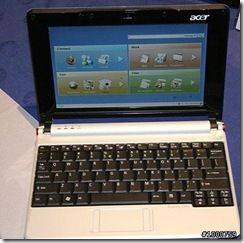
Hot on the heels of Dell's entry to the ULPC niche comes Acer's Aspire One. Both ULPC is expected to make an appearance next week at Computex. [from umpcportal]
Wednesday, May 28, 2008
Dell-icious ULPC from... Dell

Gizmodo was able to snag an exclusive photo of Dell's entry to the ULPC (Ultra Low-cost PC) niche and it looks absolutely Dell-icious!
I hope this is not one of Gizmodo's infamous practical jokes...
Via OpenBook: If At First You Don't Succeed

When Asus announced their popular Eee PC, Via Technologies followed suit with their own NanoBook reference design. Despite their similarities, the Eee PC succeeded while the NanoBook came out as a"2nd rate trying hard copycat" and the dismal reviews for Via's "baby" did not help at all.
Now, it looks like Via wants to have a second shot at the niche created by the Eee PC by releasing the OpenBook reference design website. This new design's specs are quite impressive on paper and should they pull this off at the current $400 price of similarly designed computers, Via may have a winner here.
Here's hoping...
Monday, May 26, 2008
CDisplayEx on Eee

I was a a bit bored and decided to read some comicbooks... on my Eee. I used CDisplayEx and the reading experience is pretty good!
Subscribe to:
Posts (Atom)